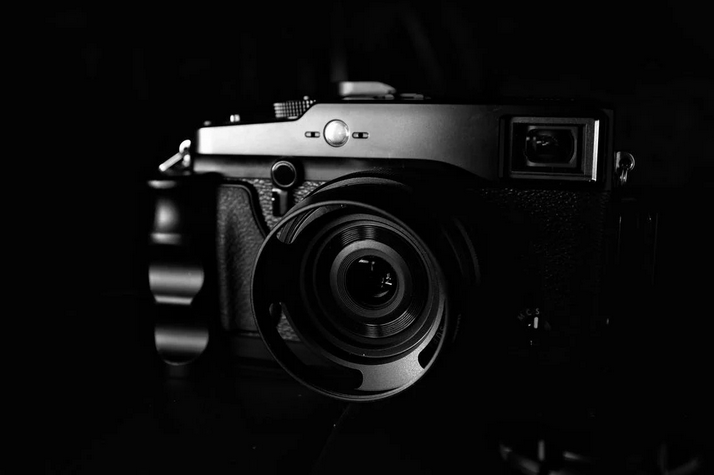
camera lens

Mirrorless Cameras: The Future of Photography?Mirrorless Cameras: The Future of Photography?

camera lens

Cameras have been around for over a hundred years, and in that time, there have been many advancements and changes. One of the most recent changes in the photography industry is the rise of mirrorless cameras. So, what are these new cameras, and why are they becoming so popular? What is the best under $1500 mirrorless camera, and why does everyone want it so much?

So many questions, right. But don’t worry, for we will go through all of them and even discuss the benefits of using mirrorless cameras.

Why Camera Have Mirrors?

lensWhen we think about cameras, the first thing that comes to our minds is probably a big, black DSLR with a huge lens. But not all cameras have mirrors. In fact, the first few generations of cameras didn’t have mirrors at all. So, what are they for, and why were they invented in the first place?

Mirrors in cameras were introduced in the late 1800s and were used to help photographers focus their shots. The way it worked was that the mirror would reflect the image that was being captured by the lens and project it onto a ground glass screen. The photographer would then look through the viewfinder to see the image and make any adjustments necessary before taking the photo.

This system worked well for many years, but there were a few drawbacks. One of which was that the image in the viewfinder was flipped upside down. This didn’t affect the final photo, but it made it more difficult for photographers to compose their shots. Another drawback was that the mirror had to be moved out of the way when taking a photo, which caused a slight delay.

So why did cameras start becoming mirrorless? The answer is simple: technology. With the advent of digital cameras, it became possible to do away with the mirror entirely and have the image projected directly onto the image sensor. This allowed for several advantages that we will discuss later.

What Are the Benefits of Mirrorless Cameras?

photographyNow that we know what mirrorless cameras are and how they differ from traditional DSLRs let’s look at some of the benefits of using them. One of the biggest advantages is that they are much smaller and lighter than DSLRs. This is because they don’t have DSLRs’ bulky mirrors and prism systems. This makes them much more portable and easier to carry around, especially for travel photographers.

Another advantage is that mirrorless cameras have shorter shutter lag times. This is because there is no need to move the mirror out of the way when taking a photo. This can be a big advantage when trying to capture fast-moving subjects.

Finally, mirrorless cameras have better battery life than DSLRs. This is because they use less power overall. So, if you’re someone who takes a lot of photos or videos, you’ll probably find that your mirrorless camera lasts longer between charges than your DSLR. Hopefully, now you know the answers to why everyone wants it so much.
Related Post

ile-type

Finding a Reliable Converter Tool to Combine PNG Image into PDFFinding a Reliable Converter Tool to Combine PNG Image into PDF

Merging images into PDF files is extremely important to many individuals who share and send files with images. Because of the large sizes of PNG images, they are not easy to share or send via online or through e-mail. In this case, a reliable PDF converter tool is needed.

The question is, which PDF converter provider should you work with? With several PDF converter tools out there, it may be perplexing to choose one that will really suit your needs. Here are some traits that you should find in a PDF converter tool to help you combine png images into PDF and do other functions.

heartEasy Conversion and Sharing

Merging PNG images into PDF files does not need to be complex. Choose a PDF converter that is convenient to use with easy to follow procedures. Once the PNG images are merged with your PDF files, you can now start sharing or sending with maximum ease.

Maintained Quality of Image

Large PNG images that are reduced into smaller sizes can lose some of its quality of the picture. An excellent PDF converter should be able to maintain the original quality of the PNG image when combined with PDF documents.

Time-Saving

Ideally, converting PNG to PDF should not involve many procedures. Find a converter that can do the job with only a few steps. This will surely help you save time. Choosing a cloud-based converter that does not require software or downloading will help you accomplish the job efficiently in a few minutes.

Simultaneous Conversions

Another way that a converter can do to help you save time is through its multi-converting features wherein it can convert many PNG images at the same time into one PDF file. Other than that, finding a PDF converter that can convert most files to PDF and vice versa without any difficulty is ideal.

Free Options

For companies with operations that involve huge transmittal of documents, they can avail of subscription plans that suit their needs. With a dependable PDF converter, it would help them a lot to send or share files, including those with PNG images. But for individuals like students, a PDF converter tool with a free version is truly a big help.


Finding a PDF converter provider that allows you to achieve all the benefits mentioned above will really make life easier, especially when your work involves a lot of document transfer. A reliable converter tool will surely make you more effective in your job.

pc

How to Download TradingView for PCHow to Download TradingView for PC

Are you an avid trader looking to take your chart analysis skills to the next level? It’s time for you to download TradingView on Windows. Why? Well, this trading app has lots of features that can make traders and investors easily reap all the benefits of being one.

The question is how? There are advanced techniques with TradingView charts that will help you make the best trading decisions. From identifying complex chart patterns to creating custom indicators and strategies, we’ve got you covered. But that’s not all – we’ll also show you how to download TradingView on your PC using LD Player Emulator since it’s not developed for PC users. This way, you can have access to these powerful tools wherever you go.

Advanced Candlestick Patterns

patterns

While most traders are familiar with basic candlestick patterns like doji and hammer, there is a whole world of advanced candlestick patterns waiting to be explored. One such pattern is the engulfing pattern. This occurs when a small bullish or bearish candle is followed by a large opposite-colored candle that engulfs the previous one. This pattern signifies a strong reversal in sentiment and can provide valuable insights into potential trend reversals.

Another advanced pattern worth mentioning is the harami cross. This occurs when a small doji or spinning top appears within the body of a larger candle. The harami cross suggests indecision in the market and often precedes significant price movements.

Complex Chart Patterns

There is nothing wrong with basic chart patterns like triangles and rectangles since it’s commonly used. However, if you want to be more advanced, rely on complex chart patterns to gain a deeper understanding of the market. The double top and bottom formations are some of them. These formations occur when there are two significant high or low points at approximately the same level. The double top indicates a potential reversal from an uptrend to a downtrend, while the double bottom suggests a shift from a downtrend to an uptrend.

Custom Indicators and Strategies

With custom indicators, traders can create unique technical analysis tools tailored to their specific needs and preferences. Traders can develop their algorithms or modify existing ones to generate signals based on their trading strategies. Additionally, custom strategies enable traders to automate their trading process by defining entry and exit conditions. This eliminates the need for manual intervention and ensures consistent execution of trades according to predefined rules.

Utilizing TradingView Alerts Strategically

charts

TradingView provides a powerful feature called alerts, which can be used to notify traders about specific price levels or conditions in the market. These alerts can be set up on various indicators, such as moving averages, MACD crossovers, or even custom scripts created by users. One effective strategy for utilizing alerts is to set them at key support and resistance levels. By doing so, traders can receive notifications when the price approaches these important areas. This allows for timely decision-making and potential entry or exit points.

But what if you prefer using TradingView on your PC? Well, we’ve got you covered. You can easily download TradingView on your computer using LD Player Emulator. LD Player is a popular Android emulator that allows you to run mobile apps on your PC.

To download TradingView using LD Player Emulator:

  1. First, download and install the LD Player Emulator from their official website.
  2. Once installed, launch the emulator.
  3. On the home screen of LD Player Emulator, open Google Play Store.
  4. Search for “TradingView” in the search bar.
  5. Locate the official TradingView app from the search results and click on it.
  6. Click on “Install” to begin downloading and installing the app.
  7. Once installed, you can launch TradingView directly from the LD Player Emulator’s home screen or through its app drawer.

With this simple process, you can enjoy all the features of TradingView right on your PC without any hassle.

code

Web Elements That Are Timeless and Will Always Work Like a CharmWeb Elements That Are Timeless and Will Always Work Like a Charm

A website can be said that it has aged like a fine wine if it uses timeless web elements. Though it may seem simple, only a few websites could survive the test of time by using the right kind of web elements. But before that, be sure to check out https://www.sfgate.com/market/article/best-vps-hosting-providers-17859179.php. If you think these elements are just about sliders to contact forms, read on. We’re going to explore the web elements that have really stood the test of time. Let’s get the list started.

Minimalism

navigate

When talking about web elements, minimalism is the first thing that comes to mind. At its most basic, minimalist design means using clean and modern visuals with plenty of white space. This helps focus on the main content while creating a feeling of sophistication. A great example of minimalism in action would be Apple’s website, which showcases its products in simple yet beautiful fashion. On top of this, minimalist design also helps to improve page loading times, which is always a plus.

Icons

Though icons are nothing new, they have become an essential element for modern websites. They are used to communicate certain ideas quickly with just one image. Plus, these little graphics can help break up the monotony of text-heavy pages and make them more visually appealing. Icons are also extremely versatile – they can be used for navigation, illustrations, and buttons. Without them, websites would look pretty dull.

Typography

It may not be as flashy as some other elements, but typography is still essential for creating a great user experience. It’s all about finding the perfect font and size to make your content easier to read. Good typography will also help create a visual hierarchy on your site, guiding viewers to the most important parts. It’s no wonder why so many designers rely on typography when creating websites – it can make all the difference in how a page looks and feels.

Intuitive Navigation

web accessBehind every great website is a great navigation system. It’s what helps the user find their way around your site and leads them to the right page quickly and easily. Intuitive navigation should be easy to use but also flexible enough to accommodate any changes you might make in the future. Good navigation can even help create stronger relationships between users and brands – people like it when they don’t have to think too hard about finding what they’re looking for.

Proper White Space

The idea of whitespace, or negative space, is simple – it’s the area on a page without anything in it. It may not seem like much but white space plays an important role in design. For one thing, it helps to draw attention to certain elements and creates breathing room between different sections. Proper white space will also make your content easier to read, making it more attractive to viewers. It’s an element that’s often overlooked but its importance should never be underestimated.

In short, sometimes, it’s not a matter of reinventing the wheel. It’s about enhancing the use of timeless web elements that will always work like a charm and enhance your website. From minimalism to whitespace, these are just some of the most essential elements you should have in your arsenal if you want to create an amazing website.