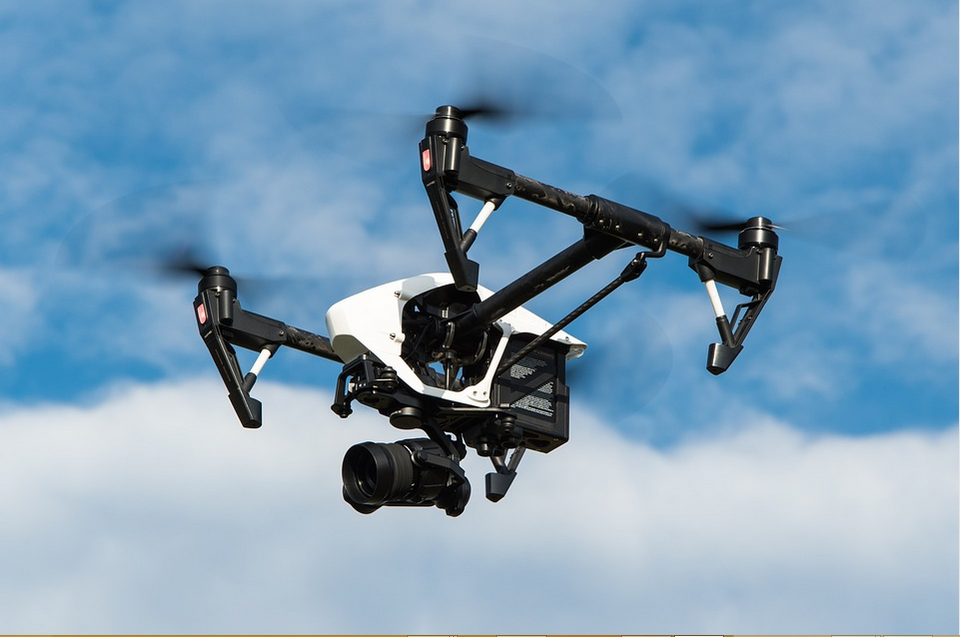
drone in the air

What Are the Various Uses of Drones?What Are the Various Uses of Drones?

drone in the air

Drones also referred to as crewless aerial vehicles, are very useful and can shoot great aerial videos. However, this is not all that drone technology can offer. They are also available in different shapes and sizes and can carry small packages and conduct aerial inspections. If you want to buy a drone, you may check out the best drone for $100, and chances are you will find one that suits your use.

Governments and organizations across the world are resorting to using drones for different purposes. NASA, DHL, Amazon, UPS, and other organizations have invested in drones for security surveillance, delivery, and other purposes. Below are some of the popular uses of drones.

Photography

drone for photographyThis is one of the most popular uses of drones. The drones have been a great boon for the photographers who resort to crewless air vehicles to take expansive aerial photos. Have you ever thought of what it will take to get the bird’s eye view of your building, beach, or city? Drones’ most popular use is photography as they have created a new way photographers take videos and photos of their favorite destinations and scenes from above.

Delivery

The delivery drones are autonomous uncrewed air vehicles used in transporting goods, food, or packages. The UAVs are also referred to as the last mile delivery drones are used in making deliveries from warehouses and stores. Different grocery and retail chains are turning to the use of drones to ensure a more efficient delivery instead of solely relying on use of trucks that are not that efficient.

Emergency Rescues

Sometimes sending humans to a rescue operation is not safe enough due to the severity of the disaster’s scope. The drones can be of great help in such a situation and can be very effective in drowning and capsized boat rescue operations. Also, drones can be deployed to help look for people trapped in the snow.

Apart from the three uses, there are also many other uses drones can be used, such as helping get medical supplies to individuals in areas that are hard to reach. The drones also help track the wildlife populations as it is quite impossible for humans to do that while on the ground. However, you will need to take your time and get the right drone as there are different types of drones and varying sizes currently available in the market.


Related Post

gamer

How to Run SuperLive Plus on PCHow to Run SuperLive Plus on PC

SuperLive Plus is a surveillance app designed to provide users with real-time access to their security cameras from a mobile device. Whether for home monitoring or managing business premises, the app delivers high-quality video feeds, playback options, and multi-channel support—all from a compact and user-friendly interface. While SuperLive Plus was originally made for smartphones and tablets, many users now prefer the enhanced control and viewing experience offered by running the app on a PC. To get superlive plus for pc, there are various steps and tools one needs. This article goes over what one needs to run SuperLive Plus on their PC.

Reliable Surveillance at Your Fingertips

Reliable Surveillance at Your FingertipsSuperLive Plus connects to various types of DVRs and IP cameras, allowing users to stream live video, take snapshots, and playback recordings. With multi-channel viewing capabilities, users can monitor multiple camera feeds at once—making it ideal for both residential and commercial setups. The app also supports motion detection alerts and PTZ (pan-tilt-zoom) camera controls, giving users the flexibility to stay informed and take action if needed. Its real-time video feed quality is one of its standout features. Whether connected via Wi-Fi or cellular data, the app offers clear and consistent footage with minimal lag. This helps ensure that users don’t miss any critical moments. Moreover, SuperLive Plus lets users organize cameras into groups, rename channels, and adjust streaming quality based on bandwidth—adding to the app’s overall versatility.


Why Run SuperLive Plus on PC?

While mobile access is convenient, monitoring multiple video streams on a small screen can be limiting. Running SuperLive Plus on a PC significantly improves the viewing experience by taking advantage of larger displays and more precise controls. For users with multi-camera setups, being able to view feeds on a wide monitor and use a mouse for camera navigation creates a far more practical and efficient setup. In addition, using SuperLive Plus on a computer is ideal for users who multitask or manage security systems alongside other software. With a desktop environment, users can monitor live footage while working on other tasks, responding to alerts, or managing camera settings without constantly switching devices. The stability and processing power of a PC also reduces the likelihood of app crashes or performance lag, especially during extended surveillance sessions.

keybord

How to Install and Use SuperLive Plus on PC with NoxPlayer

To run SuperLive Plus on your PC, you’ll need an Android emulator like NoxPlayer. This tool creates a virtual Android environment on your computer, enabling you to install and use mobile apps seamlessly. After downloading and installing NoxPlayer from its official website, open the emulator and log in with your Google account. From the built-in Play Store, search for SuperLive Plus and install it. Once installed, you can open SuperLive Plus directly from the NoxPlayer home screen and start linking your cameras as you would on a mobile device.

Conclusion

keybordSuperLive Plus offers a powerful and accessible solution for anyone looking to monitor their home or business security systems remotely. By running the app on a PC with NoxPlayer, you unlock a more expansive and efficient viewing experience. With improved controls, better screen visibility, and seamless integration with your security hardware, SuperLive Plus on the desktop provides peace of mind with professional-grade functionality.

site

Essential Web Design Tools Every Beginner Should KnowEssential Web Design Tools Every Beginner Should Know

Embarking on the journey of web design is an exciting venture, but with a plethora of tools available, it’s essential for beginners to navigate the landscape wisely. Whether you’re crafting a personal blog or diving into the world of e-commerce, having the right tools at your disposal can make all the difference. Having a clear CTA is paramount at this stage. As you explore these tools, consider your specific project needs and objectives. Are you looking to enhance visual appeal, streamline development, or improve user experience? Tailoring your tool selection to your goals ensures a more efficient and enjoyable web design process. Let’s explore a selection of essential web design tools that every beginner should know to kickstart their creative endeavors.

Graphic Design Tools: Canva and Adobe Spark

Creating visually appealing content is a cornerstone of web design. Canva and Adobe Spark are user-friendly graphic design tools that empower beginners to design stunning visuals without a steep learning curve. From social media graphics to website banners, these tools offer a canvas for your creativity to flourish.

Website Builders: Wix and WordPress

wordpress

For those starting without coding experience, website builders are a boon. Wix and WordPress provide intuitive interfaces that allow you to drag and drop elements, customize layouts, and bring your vision to life. They are ideal for building a functional and aesthetically pleasing website without delving into complex code.

Code Editors: Visual Studio Code and Sublime Text

As you progress in your web design journey, understanding the basics of coding becomes invaluable. Visual Studio Code and Sublime Text are feature-rich code editors that facilitate writing, editing, and organizing code. They come with handy features like syntax highlighting and auto-completion, making coding more accessible for beginners.

Browser Developer Tools: Chrome DevTools and Firefox Developer Tools

Understanding how your website behaves across different browsers is crucial. Browser developer tools, such as Chrome DevTools and Firefox Developer Tools, let you inspect and debug your website in real time. They are indispensable for identifying and fixing layout issues and ensuring a seamless user experience.

Color Palette Generators: Colors and Adobe Color Wheel

adobe

Choosing the right color palette is a nuanced aspect of web design. Coolors and Adobe Color Wheel assist beginners in creating harmonious color schemes. With features like color exploration and contrast checking, these tools make it easier to achieve visually appealing and accessible designs.

Version Control: GitHub

Collaboration is a common aspect of web design projects, and version control is essential to manage changes efficiently. GitHub provides a platform for version control, allowing you to track modifications, collaborate with team members, and revert to previous versions if needed.

As you embark on your web design journey, these essential tools will serve as your trusty companions. Experiment with different tools, explore their features and don’t hesitate to combine them to suit your unique design process. Remember, the key is to enjoy the creative process and embrace the learning curve. With these tools at your fingertips, you’re well on your way to crafting visually stunning and functional websites.

lady

Web Hosting Services: What to Look ForWeb Hosting Services: What to Look For

If you’re in the market for web hosting services, it’s essential to understand what to look for. Sites make it even easier by compiling lists of popular web hosting service providers. Not all hosting providers are created equal, and some offer features that others don’t. Here are some tips to help you choose the right provider for your business:

Make Sure the Provider Has a Good Reputation

coffeeIt is crucial to research and read reviews before selecting a web hosting service provider. Different platforms can be helpful in this regard, as they compile customer feedback on various companies. Choose a provider that has a good reputation and is known for providing quality services. It will help ensure that you’re happy with your choice and won’t have to switch providers down the road.

Look For a Provider That Offers a Wide Range of Features

When choosing a web hosting provider, ensure that it offers various features. It will give you the flexibility to create the website you want. Essential features to look for include unlimited storage space, bandwidth, and email accounts. In addition, be sure to ask about other features such as domain name registration, customer support, and site builder tools.

Ensure the Provider Has a Good Track Record Regarding Reliability and Uptime

Another critical factor to consider when choosing a web hosting provider is its reliability and uptime. The provider should have a good track record in this regard and provide proof of its performance. It can be done by looking at reviews or obtaining statistics from the provider. In addition, be sure to ask about its backup and disaster recovery plan.

Check to See if They Offer Customer Support 24/7/365

One of the most important aspects of any web hosting service is customer support. Make sure to choose a provider that offers customer support 24/seven days a week. It will ensure that you can get help when you need it. Avoid service providers that only offer customer support during certain hours or have limited contact options.


Find Out How Much Storage and Bandwidth They Offer

phoneWhen choosing a web hosting provider, it’s essential to consider how much storage and bandwidth they offer. It will give you an idea of how much space your website will have and how many visitors it can accommodate. In addition, be sure to ask about the average load time for their servers. By following these tips, you’ll be able to find the perfect web hosting provider for your business.